Your energy traffic light for family life
See in seconds how full your battery is right now – especially when things get stressful. Get ideas that fit exactly this moment. And see in your mood journal what drains your energy.
Runs right in your browser – on phone and computer.
Your energy level at a glance
FlowParent’s features at a glance
FlowParent helps you easily recognize your energy in everyday life with babies and children, share it with your loved ones and recharge.
The screenshots show the real app with a made-up example family: Lena, her partner Tobias, Mia (3) and Ben (9 months).
Best practice: how to use FlowParent simply and get the most out of it every day-
AI suggestions
Get concrete ideas that match your energy right away: at green, FlowParent encourages you in what you’re doing; at yellow, you get impulses to regain your strength; and at red, ways out of your energy low. Content, tone and length adapt to your interests, preferences, profile settings and your regular feedback.
In everyday life: In stressful, overwhelming moments you get a doable idea for exactly your situation within seconds. Breaks become realistic, reflection is encouraged, and your family experiences a calmer you.
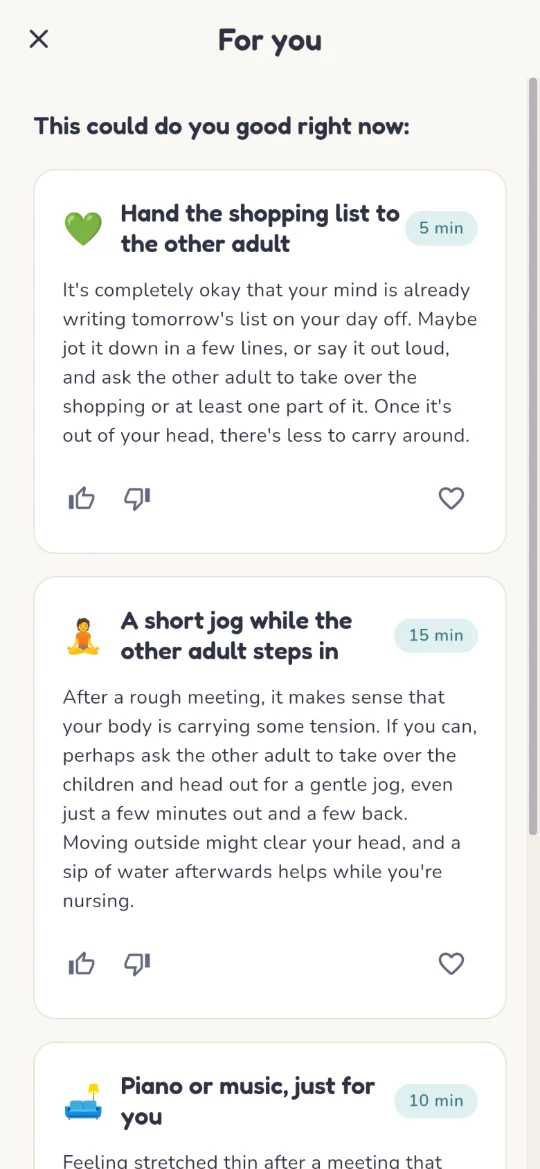
Lena after a difficult team meeting, light on yellow: three ideas for the next few minutes. -
Share your energy level and messages
Send your traffic-light color (green, yellow, red) – with a personal message if you like – to your partner or other family members. You decide who receives your updates and whose messages you get.
In everyday life: Your loved ones know right away how much energy you have left, without you having to explain much. So someone can step in, be considerate or simply check in – before misunderstandings arise.
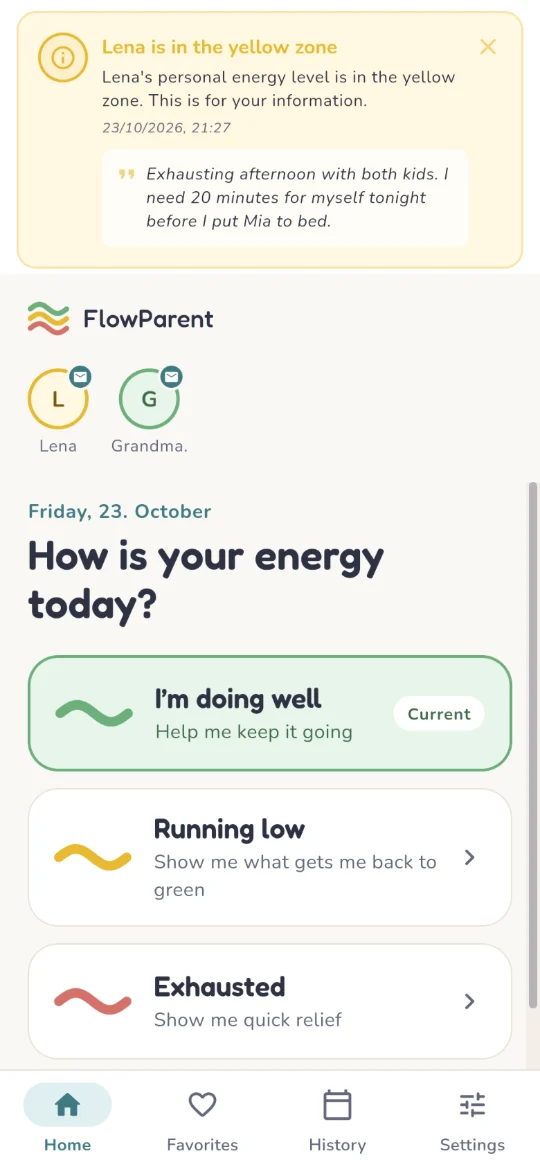
Tobias sees right away that Lena is in the yellow zone – along with her message. -
Calendar
The calendar is your mood journal: each calendar day records your lowest energy level of the day. You can change or add your traffic-light color, notes, working hours, menstrual cycle and stress or relaxation factors at any time – or delete them.
In everyday life: You see at a glance how your weeks really went – instead of only remembering the exhausting days.
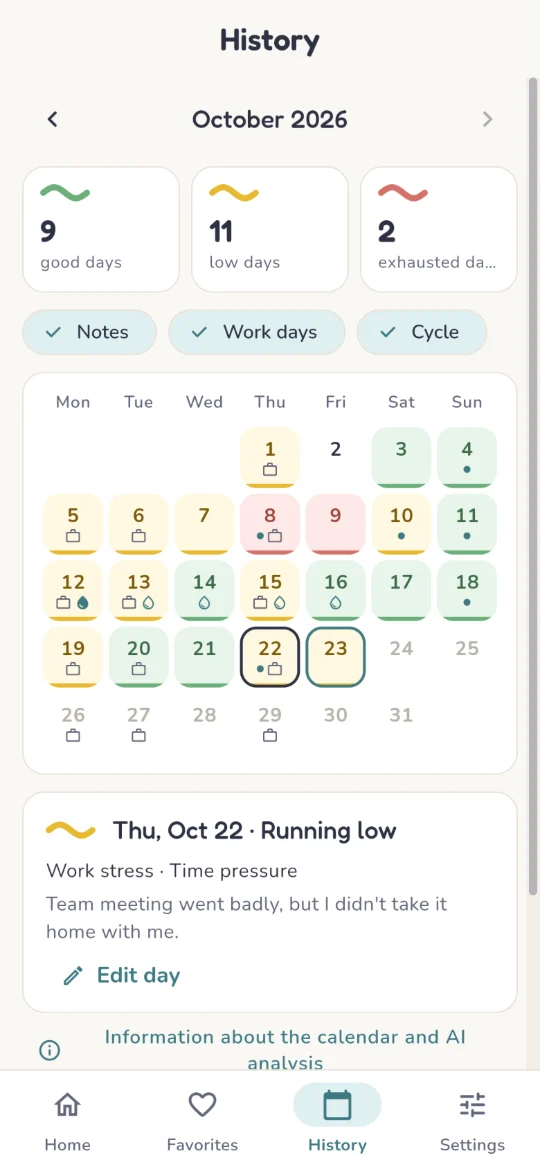
Lena's October: one colour per day, with the note from that long Thursday below. -
AI analysis of your calendar
Charts show your traffic-light colors up to four months back. A detailed written analysis of all colors, daily notes and stress and recovery factors reveals connections and patterns you may have missed in everyday life.
In everyday life: You recognize what regularly drains your energy – such as certain weekdays, busy work phases or other stressors – and can take targeted action, on your own or as a family, instead of sliding into the same exhaustion again and again.
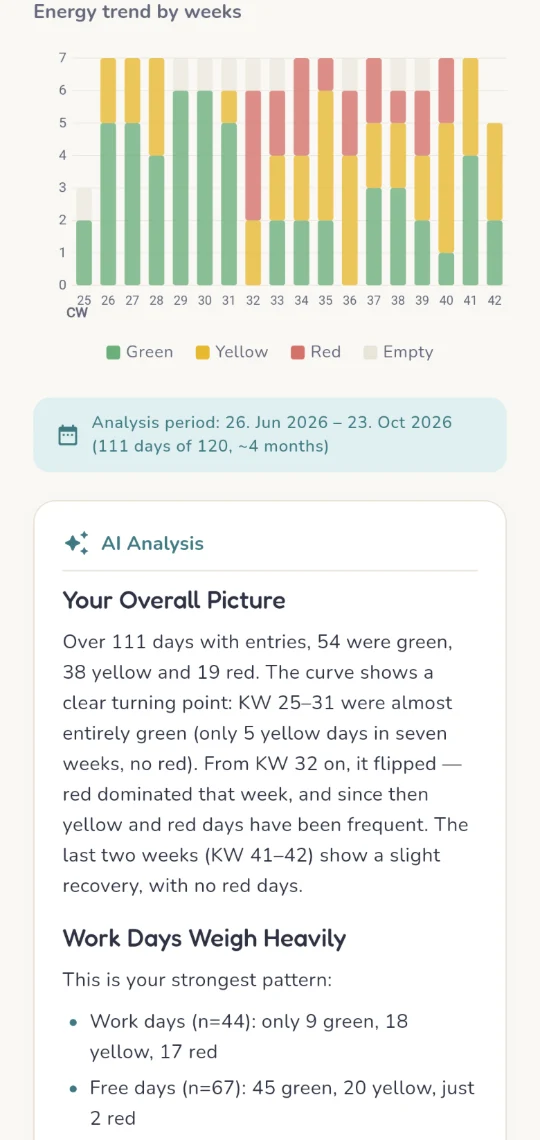
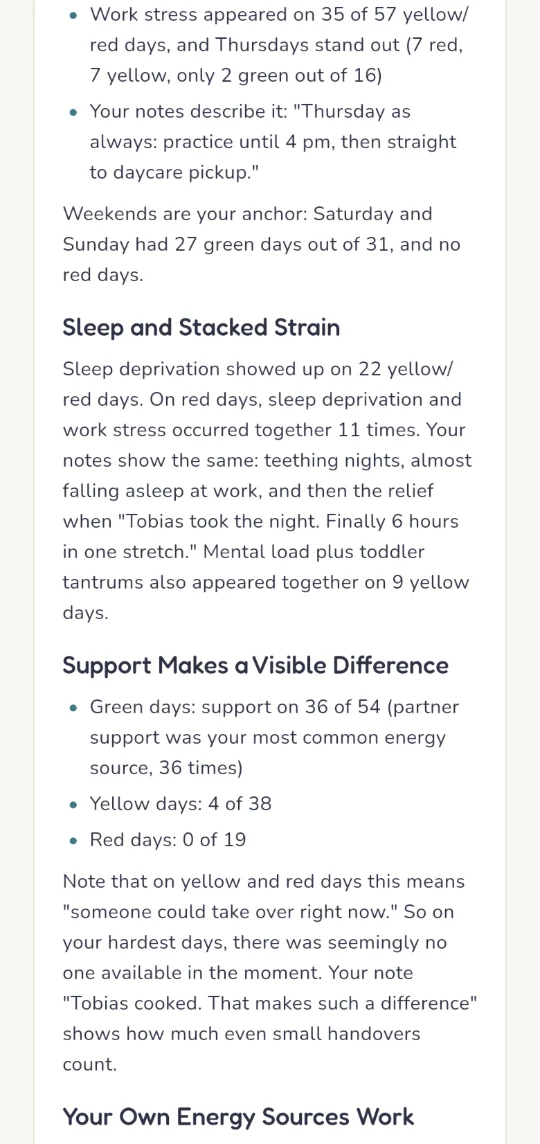
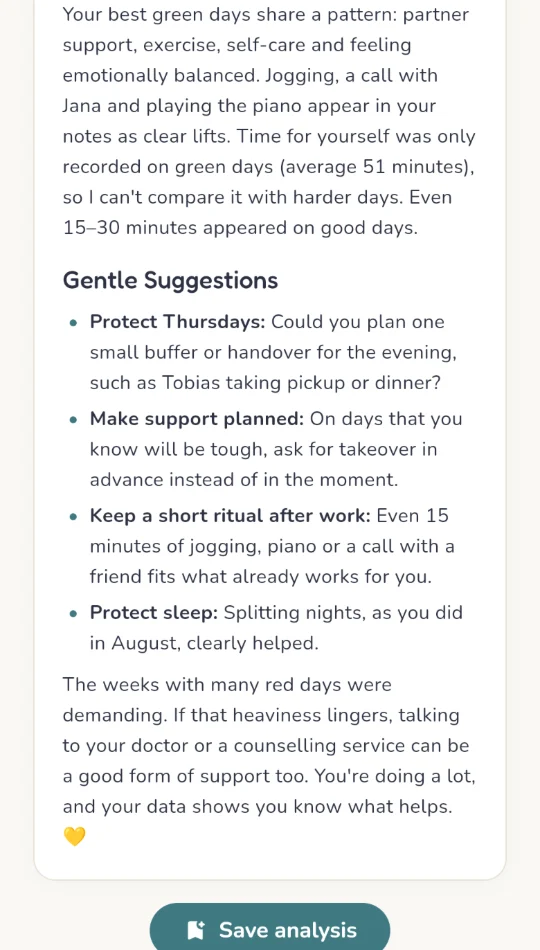
Four months at a glance – and the AI's full write-up. Swipe sideways to read on. -
Save analyses
Save up to five AI analyses of your calendar, with charts and text – exactly as you read them. When all slots are full, FlowParent replaces the oldest one automatically.
In everyday life: You can compare months and see whether a change – say, a new way of sharing tasks at home – really made a difference.
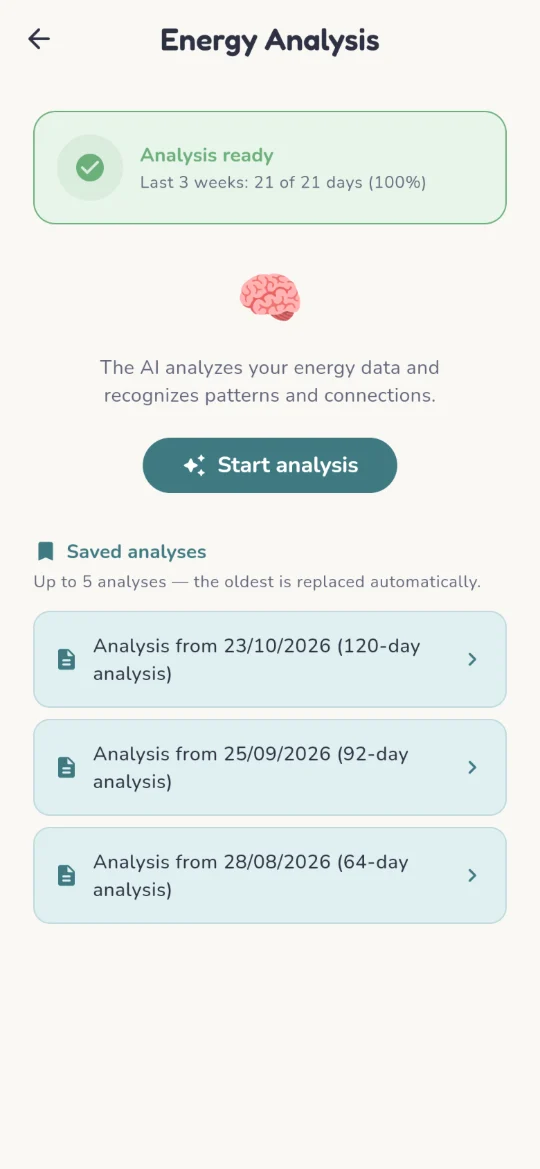
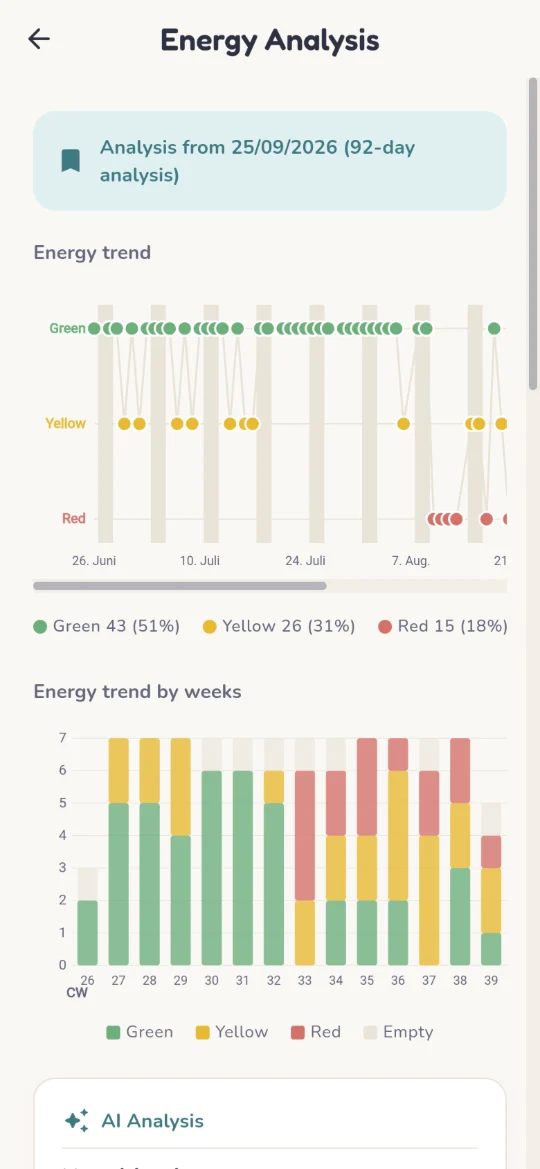
Three saved analyses from late August until today – each with the charts as they were back then. -
For women
If you wish, your cycle and breastfeeding can be taken into account in the suggestions. This data stays encrypted on your device.
In everyday life: Fluctuations in your energy get an explanation, and the suggestions match what your body can manage right now. That takes away unnecessary pressure and self-blame.
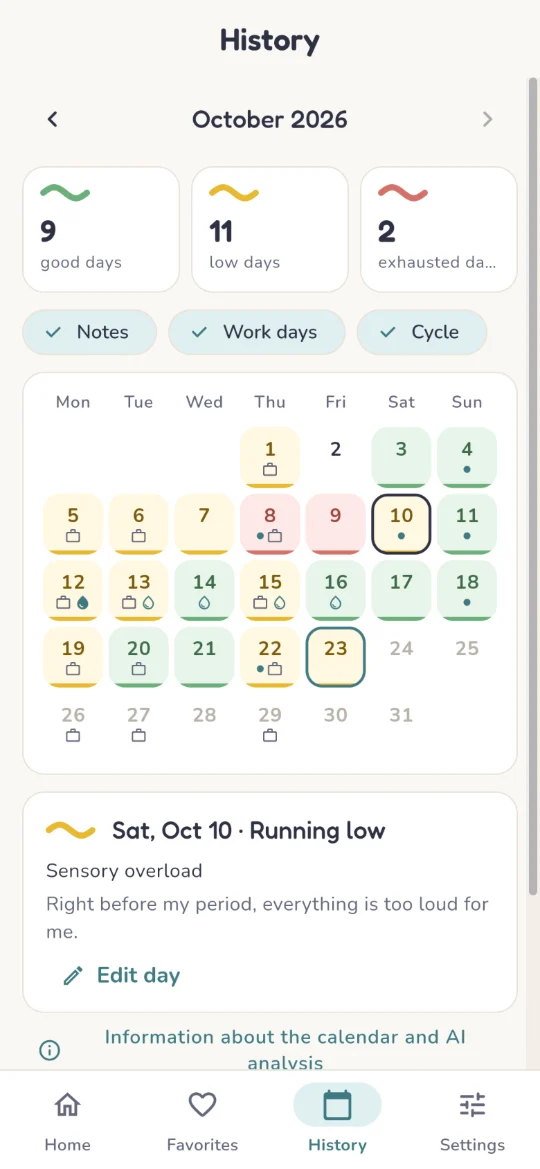
The drops mark Lena's period; her note from the Saturday before explains the yellow day. -
Favorites
Save up to six AI-generated suggestions that help you most.
In everyday life: On difficult days you don’t have to search: your proven sources of energy are just one tap away.
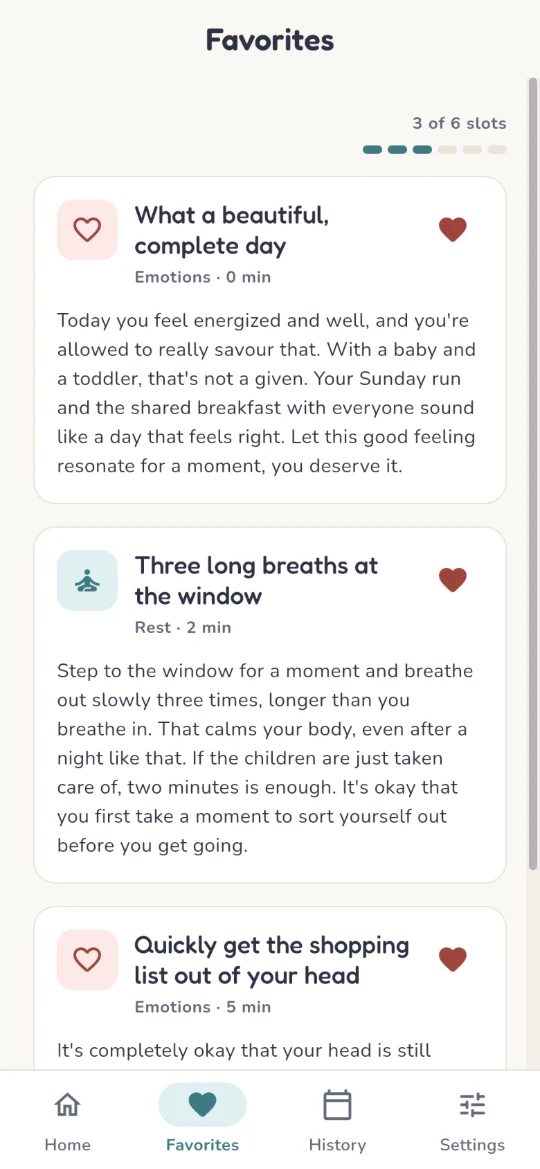
Saved suggestions – ready for the next hard day. -
Gentle reminder
No calendar entry for a few days? FlowParent reminds you – at a time and frequency that suits you.
In everyday life: This turns the quick check-in into a habit without you having to remember it. And the more regularly you log, the more meaningful your calendar, analysis and suggestions become.
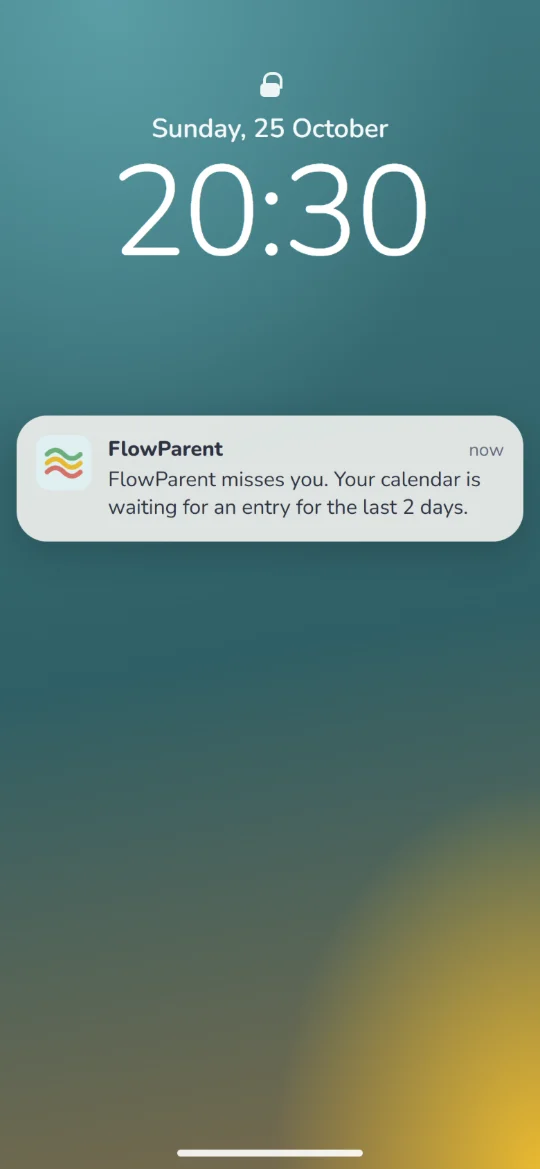
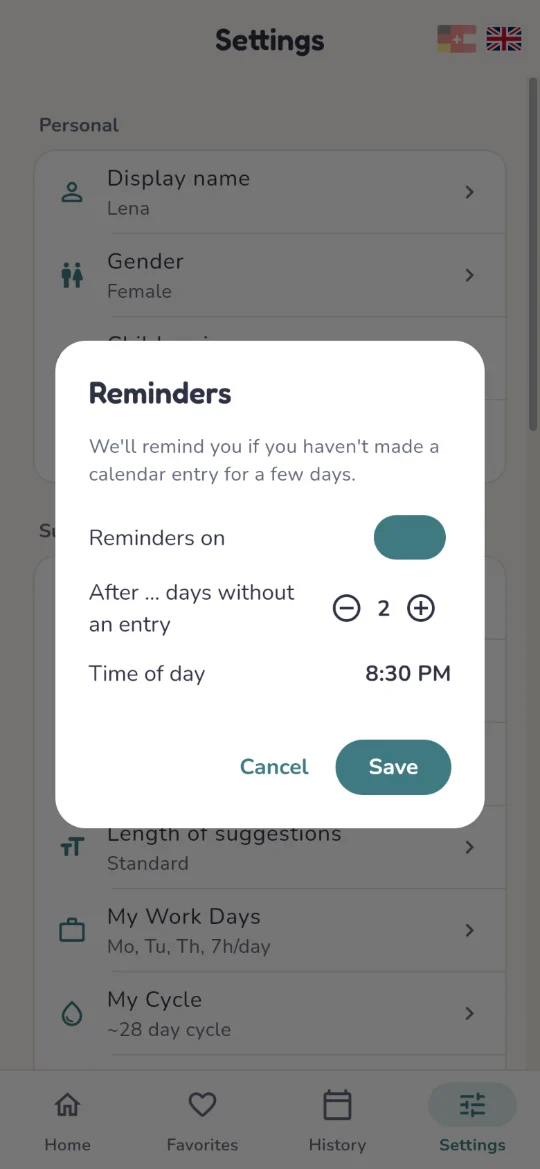
Two days without an entry: a gentle notification arrives at 20:30 (lock screen recreated). You choose the rhythm and the time.
FlowParent is a helpful, low-threshold and supportive building block in your everyday life. The app does not replace direct personal communication and is neither a psychological advisor nor a therapist. If you experience persistent, severe strain, please seek professional help.
Best practice
How to use FlowParent simply and get the most out of it every day
- Once a day, a mindful message to your loved ones. Send your partner a few words about how your day went overall or how you’re feeling. It brings you closer.
- A short calendar entry every day. In the free-text field of the calendar day, use your keyboard’s dictation feature to describe quickly and easily what went well or what was hard. These entries are the basis for the AI calendar analysis – and they also help you understand how your energy changes over time.
- Save AI calendar analyses. Once you’ve filled in your calendar for 14 days, FlowParent can create an AI calendar analysis. Often this period already shows the first things that stand out. Save the analysis, adjust any routines in your everyday life that need it, and only pick up detailed calendar entries again when you want a new period analyzed. At least two weeks are recommended, ideally three to four.
Good to know: the AI analysis is available once you have 14 calendar entries in the last three weeks. It analyzes as far back as you’ve logged on at least 67% of the days – four months at most.
- Look back now and then. The color scales of the last few weeks show you at a glance how things really were. The AI analysis goes deeper: it makes connections visible that were hidden from you so far – or that you suspected but didn’t yet want to admit. That brings clarity, and changes to family life become easier to put into practice.
- In difficult moments: FlowParent as your sparring partner. When things get tight, tap your color and get ideas. Unlike a general AI chat, FlowParent knows your situation and your sources of energy better. You don’t have to write an elaborate prompt – the app supplies the right one in the background. Try to remember this tool in difficult moments and use it. You’ll be surprised how well it leads you to ideas that fit your situation.
- Collect favorites. Save the suggestions that really help you. That way your proven sources of energy are right at hand on hard days.
- Keep the good messages. You can pin messages from your family that do you good and keep them as a reminder – for days when you especially need them. It feels good to look back at how your exchanges have developed and to enjoy the positive messages again.
- For women: keep your cycle in mind. If you log your cycle, you can see whether your mood and energy are linked to your period. That explains some of the ups and downs and takes off pressure.
- Set the reminder to suit you. Choose a time that fits well into your routine every day. Then the short entry becomes a habit all by itself.
Frequently asked questions
How can I gauge my own stress level?
The simplest way is with three colors: green means you have energy. Yellow means it’s getting tight, but you’re managing. Red means your battery is empty. In FlowParent you tap your color with a single touch, as often a day as you like. Without signing up, you can try it with the energy check.
Which app helps parents when it all gets too much?
FlowParent is made for exactly these moments. You choose your traffic-light color, what’s draining your energy right now and how much time you have, and within seconds you get ideas that take little effort. If you want, your family can see your color and take some of the load off you.
Can I track and review my mood?
Yes. The calendar is your mood journal: every day it records your traffic-light color, along with notes and what drained or gave you energy. The AI analysis reviews up to four months and shows you patterns you may have missed in everyday life.
How can I best fit the app into my everyday life?
It’s easiest with a fixed moment each day, for example in the evening when things calm down: tap your color and briefly note what drained or gave you energy today. It only takes a moment. Add FlowParent to your home screen for this (you’ll find the guides for iOS and Android further up) and set the gentle reminder to suit your rhythm. In demanding moments during the day, one tap on your color is enough to get fitting ideas.
How do I use the app most effectively?
The more honestly and regularly you log, the better the suggestions and the analysis fit you. When you get suggestions, briefly say whether an idea helped: FlowParent adapts content, tone and length accordingly. Whatever did you particularly good, you save as a favorite – then it’s at hand on difficult days. And look at the AI analysis now and then: it shows you which patterns emerge over the weeks.
What should I keep in mind when using the app?
Be honest with yourself: there’s no wrong color, and red days aren’t a failure but important signals. Take the suggestions as an offer, not an obligation, and pick what fits right now. Think about who you want to share your color with – that’s up to you. And remember: FlowParent doesn’t replace talking with your loved ones or professional help if you haven’t been doing well for a long time.
What benefits can I expect from using the app?
You notice sooner when your battery is running low and can act before it turns red. In difficult moments you get a doable idea in seconds instead of having to think it over for a long time. Your family knows how you’re doing without you having to explain much. And over the weeks you recognize what regularly drains your energy and what does you good – a good basis for changing something, on your own or as a family.
Does FlowParent replace counseling or therapy?
No. FlowParent is a low-threshold building block for your everyday life, but not a psychological guide and not therapy. If you’ve been feeling heavily burdened for a long time, please get professional help.
What happens to my data?
Your data is stored encrypted in a database in the EU or Switzerland. Cycle and breastfeeding data stay encrypted on your device. For the AI suggestions, information is only sent to Anthropic with your consent, and Anthropic doesn’t use it for training. There are no tracking cookies and no advertising IDs, and with “Delete all data” everything is gone immediately. You’ll find the details in the privacy policy.